What this does
The Careers page is the list of every career Samantar tracks in the state you picked. You find a career by typing its name, or a license or credential short form such as RN, CPA, BCBA, PMP or CDL-A, and then open its career page. The career page shows what the job involves, what it pays in your state, how it is expected to grow, and which schools in your state lead into it.
The same page has a second view, the Career hub. It opens when you follow a career link from the home page overview or a state page. The hub is a one-screen snapshot of one career: other names for the job, typical pay, the ten-year outlook, yearly openings, the education usually needed, and the routes people take into the work.
- Students use it to see which careers are open to them and what each one needs.
- Parents use it to check what a career pays in your state before talking about schools.
- Counselors use the credential search to go from a short form a student mentions ("I want to be a BCBA") to the right career page.
Before you start
- Pick a state. Careers, schools and pay are shown one state at a time. If no state is chosen yet, the page shows only a card that reads Pick a state to see careers and pay. with the line "Schools, careers and pay on this page are shown one state at a time. Choose a state below and the page will load for it." and the Showing data for menu. Choose your state there and the list loads. The site remembers your choice on this device for the next pages you open.
- Pick the state where you plan to work or study. Pay, outlook and the schools on the career page all come from that state. To look at another state, change Showing data for; the page reloads for it.
- Have a career or a credential in mind, or nothing at all. With an empty search box the page lists careers from A to Z, so you can also browse.
- If a state's data has not been loaded yet, the page shows one line instead: "Data for your state isn't available yet. Please check back soon."
Step by step
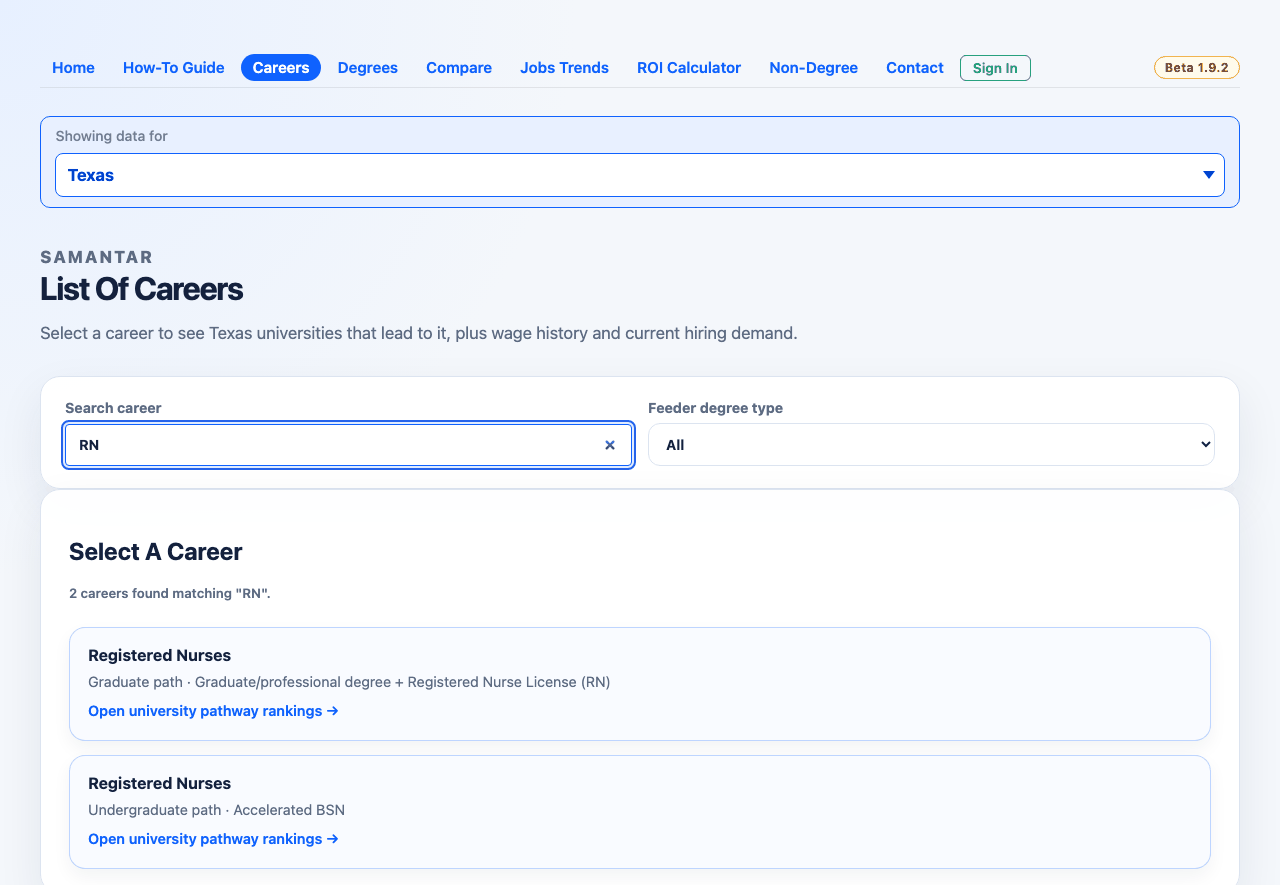
Find a career in the list
- Open Careers from the top menu. The heading reads List Of Careers, and the list under Select A Career shows "Loading — this may take a moment on first load…" while it fills.
- Check Showing data for names your state. If it does not, pick your state; the page reloads with that state's careers.
- Type in Search career (the box says "Type a career title"). You can type a job title ("electrician", "software developer") or a short form ("RN", "CPA", "PMP"). The list updates a moment after you stop typing, and the count line changes to say how many careers match your search.
- If you only want careers reached through a certain kind of education, choose it in Feeder degree type: Degree, Undergraduate, Graduate or Non-Degree. The list reloads with your search still applied.
- Read the cards. Each card shows the career name, a line such as "Undergraduate path · Direct from listed degree", and a link line.
- Click a card. A degree card (Open university pathway rankings →) opens the career page with schools in your state. A non-degree card (Open non-degree pathway rankings →) opens the career's non-degree routes instead.
Use the Career hub
- Click a career name in the home page overview or on a state page. The Careers page opens in hub view: the page heading changes from List Of Careers to the career's name, the list is hidden, a ← All careers link sits at the top, and a card headed Career hub shows the career name, "Loading career summary…" and then the snapshot. If no state is chosen yet (for example, you came from the United States view), the page first asks Pick a state to see pay and schools for career. (or "for this career"); pick a state and the hub loads for it.
- Read the Also known as: chips and the number tiles (pay, outlook, education, openings).
- Under Paths into this career, narrow the route cards with Pathway type, Max total cost, Max duration, License required and Military pathway. The line above the cards changes to "Showing n of N pathways" and counts the filters you set.
- Click View your state schools on a route card to open the list of schools that teach it, with graduates' earnings where they are published.
- Use the five link cards (Current trends, Wage history, ROI calculator, Related degrees, Compare) to carry the same career to another tool.
- To get back to the full list, click ← All careers above the hub. The heading returns to List Of Careers and your state is kept.
Every control explained
| Control | Where | What it changes | Default | Tips |
|---|---|---|---|---|
| Showing data for | Top of the page (also on the "Pick a state" card) | The state whose careers, pay and schools you see. Changing it reloads the page for the new state. | The state you last picked on this device; none on a first visit | Every link you follow from here keeps the same state. |
| Search career ("Type a career title") | List view, left box above the list | Narrows the list to careers whose title matches your words, plus careers found through known short forms and the credential list (see "How the credential search works" below). The list reloads a moment after you stop typing. | Empty: every career, A to Z | Type the short form on its own ("BCBA", not "BCBA certification"). Clear the box to go back to the full A to Z list. |
| Feeder degree type | List view, right of the search box | Which education route the cards are for: All, Degree (undergraduate or graduate), Undergraduate, Graduate or Non-Degree. Works together with the search. | All | A career can appear more than once under All: one card per route (for example an undergraduate card and a graduate card). |
| Career card | List view, under Select A Career | Opens the career page for that career and route, with your state kept. If the card was found only through a credential name (not through the career's title), the career page opens with a short About this match note naming that credential. | — | Undergraduate and graduate cards open the school ranking for that level; non-degree cards open the non-degree routes. |
| Current trends link card | Career hub, link row | Opens Jobs Trends with this career already chosen: hiring demand by metro and employer leaderboards, from the postings sample. | — | Posting counts there are a sample, not all hiring. |
| Wage history link card | Career hub, link row | Opens the long-range wage history for this career (it now lives inside Jobs Trends). | — | Shows pay over many years, before and after inflation. |
| ROI calculator link card | Career hub, link row | Opens the ROI Calculator for your state. | — | Pick a school and degree there to see cost against expected earnings. |
| Related degrees link card | Career hub, link row | Opens the Degrees page for your state. | — | For the programs that lead into this one career, open its career page and use Related degrees there. |
| Compare link card | Career hub, link row | Opens the Compare page, where you choose what to compare. | — | Choose careers there to put this one beside another. |
| Pathway type chips | Career hub, above the route cards | Shows only the route types you click: No formal credential, On-the-job training, Apprenticeship, Certificate, Associate's, Bachelor's, Master's, Professional doctorate, Research doctorate. Click again to turn one off. | None selected (all types shown) | You can turn on several at once. |
| Max total cost | Career hub | Hides routes whose cost is above the limit: Any, Free ($0), Under $5,000, Under $25,000, Under $75,000. | Any | The top of a route's cost range is compared with the limit. |
| Max duration | Career hub | Hides routes that take longer: Any, 6 months or less, 1 year or less, 2 years or less, 4 years or less. | Any | Useful when you need to start earning soon. |
| License required | Career hub | Any, No license needed or License required. | Any | A route that needs a license names it on its card. |
| Military pathway | Career hub | Any or Military path available. | Any | Shows only routes that have a military path. |
| Reset filters | Career hub, end of the "Showing … pathways" line | Clears all five route filters at once. | Shown only while a filter is on | — |
| View your state schools (n) | Career hub, bottom of each route card | Opens a window listing the schools in your state that teach this route, with graduates' earnings. | — | The button is greyed out and reads No your state school data or School outcomes not yet available for your state when there is nothing to show. |
| School filter ("Filter by institution or award level...") | Schools window | Narrows the schools to names or award levels that contain your text. | Empty | Try "associate" or "certificate" to see one level. |
| Close × | Schools window, top right | Closes the window. | — | The Esc key or a click outside the window also closes it. |
Reading the results
How the credential search works
The Search career box looks for matches in three layers and puts the results together:
- Career titles, with known short forms. Every word you type must appear in the career's official title. Short forms the site knows are also turned into title words: RN becomes "registered nurse", CPA becomes "accountant" and "auditor", BCBA becomes "behavior analyst", PMP becomes "project manager", and the same is done for many others (MD, NP, PA, LPN, JD, PE, CFA, CFP, LCSW, EMT, PharmD and more). A two- to five-letter query can also match a title's initials, so "RN" finds Registered Nurses.
- A broader phrase. For a query of two or more words, leading words such as "registered", "certified", "licensed", "professional" and "qualified" are dropped and the rest is tried again. So "registered nurse" also brings up nurse practitioners, nurse anesthetists and nurse midwives.
- The credential list. Samantar keeps a hand-built list of credential and license names, each tied to the careers that use it, for example "Board Certified Behavior Analyst (BCBA)", "Project Management Professional (PMP)", "Commercial Driver's License Class A (CDL-A)" and "Registered Nurse (RN)". Your text has to appear in a name as a whole word or short form: "RN" finds "Registered Nurse (RN)" but not "Certified Critical Care Registered Nurse (CCRN)", "Attorney" or "Journeyman Electrician", whose letters only happen to contain it. This layer is what finds CDL-A: no career title contains it, so only the credential list leads to the truck-driving career.
What this page does not search: the long list of other job titles from O*NET (the federal occupation database). That list feeds the Also known as: chips in the hub and the career search on Jobs Trends, but not this box, because it brings in too many unrelated careers.
Order of results. Careers whose title matched come first. Careers found only through the broader phrase or the credential list come after them. Within each group, careers are listed by outcome measures: earnings, completion and cost, with ties in A to Z order. With an empty search box the whole list is A to Z.
How many show. Up to 300 cards. When the list reaches 300 the count line reads Showing first 300 careers — search to narrow the list. Otherwise it reads, for example, "12 careers found matching "RN"."
No match. The count line reads No careers found matching your search. and no cards show. Try the full title, a shorter word, or set Feeder degree type back to All. A career also only appears if it is in your state's list, so a credential can find nothing in one state and something in another.
List cards
| Item | Meaning | Source | How it is worked out |
|---|---|---|---|
| Career name | The official occupation title. | BLS Standard Occupational Classification titles, via O*NET | — |
| Undergraduate path / Graduate path / Non-Degree path | The education route this card covers. | Federal education-to-occupation crosswalk (NCES and BLS) and Samantar's non-degree routes | Each career gets one card per route that leads to it in your state. |
| Route summary (after the "·") | What the route usually asks for: "Direct from listed degree", "Requires license", "Direct — credential recommended", "Additional education beyond listed degree", "Graduate/professional degree + license", "Career advancement (5–15 yrs experience)", "Non-degree pathway", or "Pathway varies". | Crosswalk plus O*NET education and training data | The most common summary across the programs that feed the career. |
Career hub
| Item | Meaning | Unit | Source and year | How it is worked out |
|---|---|---|---|---|
| Also known as: | Other titles people use for this job. | Up to 12 chips | O*NET alternate and reported job titles, plus Samantar's credential list | The titles O*NET shows to job seekers first; otherwise reported titles; otherwise alternate titles. The row is left out when there are none. |
| State median wage | The middle annual wage: half of workers earn more, half less. | Dollars per year | BLS Occupational Employment and Wage Statistics (OEWS); the tile prints the survey year | The latest year with a published median for your state. |
| 10-yr State outlook | Expected change in the number of jobs over the projection period. | Percent change | State long-term projections (Projections Central); the tile prints the years (2022–2032 for most states, 2024–2034 for a few) | Projected jobs at the end ÷ jobs at the start, minus one. |
| 10-yr U.S. outlook | The same for the whole country. | Percent change | BLS Employment Projections, 2024–2034 | As above, national. |
| Typical education needed | The usual credential for an entry-level worker. | Text | BLS / O*NET | Shows "Education varies by employer" when none is published. |
| Annual openings (State) and Annual openings (U.S.) | Jobs expected to open each year, from growth plus people leaving the job. | Openings per year | Same projections as the outlook tiles | Published in thousands; shown as whole numbers. |
| Route card | One way into the career, with how common it is, Typical duration ("Immediate", months or years), Typical cost ("Free", a dollar range, "up to" a figure, or "—"), and Starting wage when known. Flags show License: name and Military path. | Months or years; dollars | O*NET education, training and experience data plus Samantar's route list | A tile with no value is left out rather than shown empty. |
| Schools window table | Institution, Award level, Cohort (graduates counted), Median 1y wage, Median 5y wage, Median 10y wage. | Dollars per year; people | U.S. Department of Education College Scorecard program earnings, matched by the state's higher-education board | The most recent graduating class with earnings, per school and award level, in A to Z order. A dash means the figure is withheld because the class was small. |
Missing tiles are dropped, not shown as zero. More detail on sources and vintages: how the figures are produced.
Worked example
A parent in Texas checking nursing.
- She opens Careers. No state is stored on her laptop, so the page shows "Pick a state to see careers and pay." She picks Texas in Showing data for and the A to Z list loads, with a count line at the top.
- She types RN in Search career. The count line changes to "2 careers found matching "RN"." Both cards are Registered Nurses, because "RN" matches the title through the known short form. No other career appears: a credential name counts only when RN stands in it as a whole word, so names that merely contain the letters, such as "Certified Registered Nurse Anesthetist (CRNA)", do not bring their careers in.
- The two cards are two routes into the same career: one marked "Graduate path" and one "Undergraduate path", each with a short route summary.
- She sets Feeder degree type to Undergraduate; only the undergraduate card stays.
- She clicks Open university pathway rankings →. The career page opens as "Registered Nurses in Texas", with the job description, pay tiles in dollars per year, and the Texas schools that lead into the career. There is no About this match note, because she found the career by its title, not through a credential name.
Had she set Feeder degree type back to All and typed CDL-A for her son instead, no title would match, and the credential list alone would bring up one card: Heavy and Tractor-Trailer Truck Drivers, a non-degree path, with Open non-degree pathway rankings →. Its career page opens with an About this match note naming the commercial driver's license. Typing CDL would bring up all four commercial driving careers (class A, class B for trucks and for buses, class C).
Common questions
- Why does the same career appear twice?
- Each card is one education route. A career reached from both bachelor's and graduate programs gets an undergraduate card and a graduate card. Set Feeder degree type to one level to see one card.
- I typed a credential and got nothing. Why?
- The credential has to be in the site's short-form table or its credential list, and the career has to be in your state's list. Try the full title ("behavior analyst", "truck driver"), or check the spelling of the short form, including any dash (CDL-A).
- Why does Jobs Trends find a career for a word that this page does not?
- Jobs Trends searches the full O*NET list of alternate job titles. This page searches career titles, known short forms and the curated credential list only, to keep unrelated careers out of the results.
- Why does the list stop at 300?
- The page loads up to 300 careers at a time. Type in the search box or pick a Feeder degree type to narrow it.
- Why is a hub tile missing?
- Tiles with no published number are left out. Small or new careers may have no state projection, and a few have no state median wage.
- Why is the schools button greyed out in the hub?
- School-level graduate earnings come from the College Scorecard where the state's higher-education board has matched program data. Where that match is not yet available for your state, the button reads School outcomes not yet available for your state. The career page still lists your state's schools with costs and ranks.
- Why do the numbers change when I switch states?
- Pay, projections, openings and schools are all for the state in Showing data for. The same career can pay quite differently in two states.
- What does "Pathway varies" mean on a card?
- The programs that feed this career do not share one most common route, so no single summary fits.
What this does NOT do
- It is not a job board. It does not list open jobs or let you apply.
- It is not career advice. It shows published statistics so you can ask better questions.
- Pay and outlook figures are estimates for all workers in the state, not a promise of what you will earn.
- It stores nothing about you. The only thing kept on your device is the state you picked. Signing in is needed only to save reports elsewhere on the site.
- The search box does not search the full O*NET list of alternate job titles; use the Jobs Trends search for that.
- The hub does not show careers from other states side by side; switch Showing data for or use Compare.
Related
- Career page: every panel on a career's page.
- Degrees for a career: the programs that lead into a career.
- Non-degree routes for a career
- Choosing a state
- Jobs Trends
- Compare careers
- ROI Calculator
- Degrees
- Open the live page: Careers